🔗 Project Page · 📖 Paper · ⭐ GitHub · 📊 Dataset · 🤗 Checkpoints
## Model Description **GenS** (Generative Frame Sampler) is a novel approach that identifies question-relevant frames from long videos spanning minutes to hours. Given a long video and a user question, GenS effectively searches through the original massive collection of frames to produce a concise selection and enhances the performance of downstream VideoQA Assistants (such as Qwen2-VL, LLaVA-Video, VILA-v1.5, and Aria) by providing fewer but more informative frames. GenS is built upon advanced long-context VideoLLMs (such as Aria and Qwen2.5VL), transforming key frame sampling into a generative task.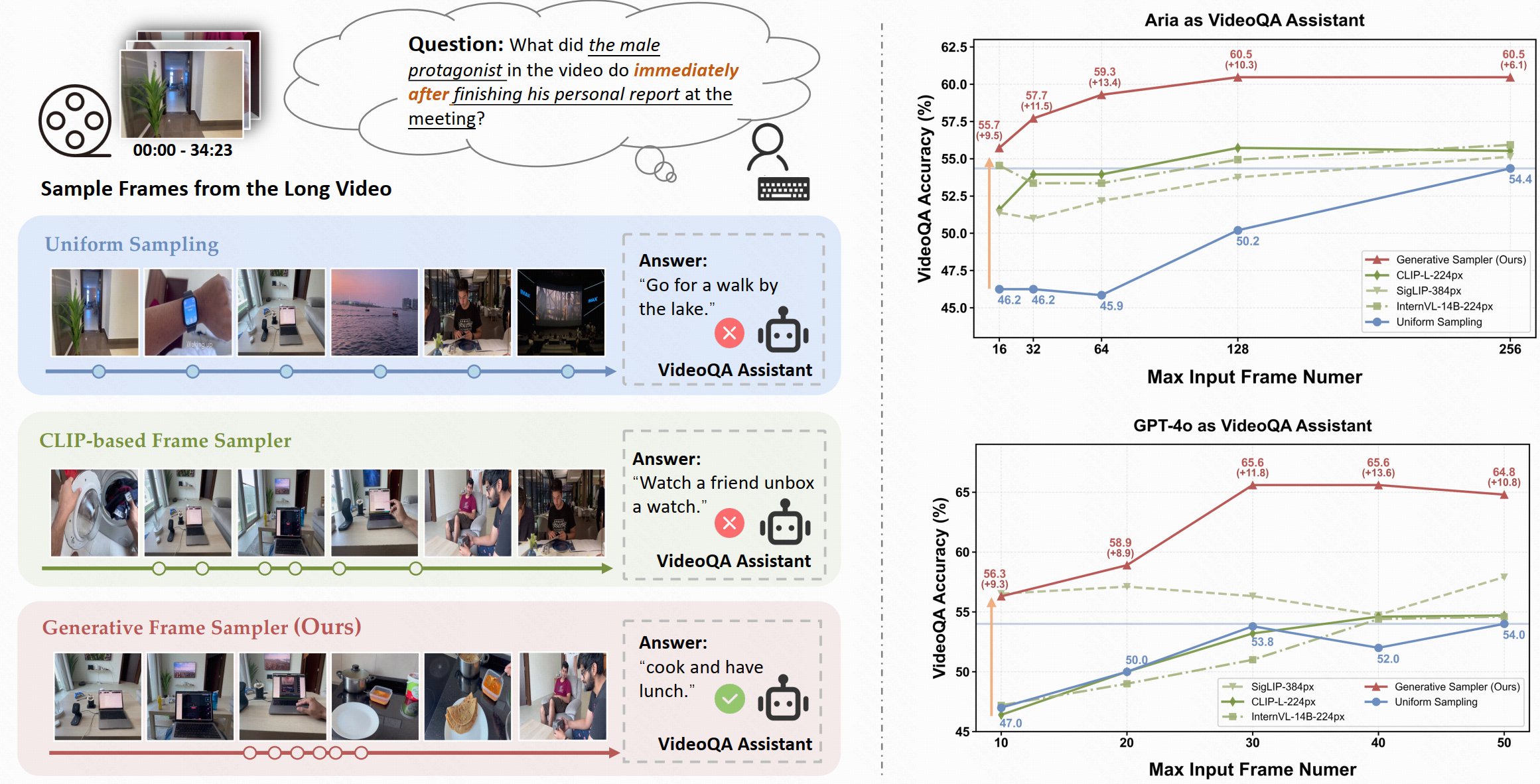 ## Key Features of GenS
✨ **Temporal Understanding:**
GenS effectively captures temporal relationships between successive frames, enabling complex reasoning about temporal sequences such as "immediately after" events in videos.
📝 **Complex Instruction Understanding:**
Powered by built-in LLMs, GenS comprehends complex and flexible textual instructions, allowing it to interpret nuanced queries and identify the most relevant visual content.
⚡ **Effective Video-Text Alignment:**
Its native multi-modal architecture enables sophisticated multi-hop reasoning by seamlessly aligning long-range temporal cues with language semantics, resulting in more accurate frame selection.
🎉 **State-of-the-Art Performance:**
GenS significantly boosts the performance of various VideoQA models, achieving SOTA results on long-form video benchmarks when integrated with open-source models.
## Performance Highlights
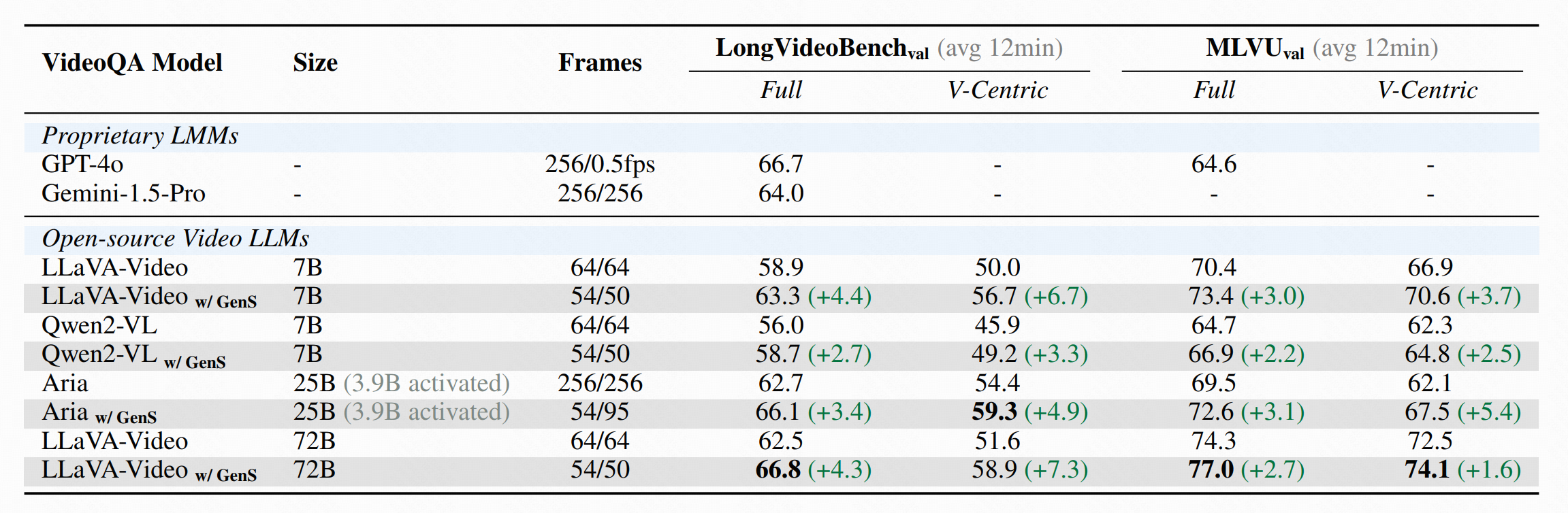
- 🏆 **LongVideoBench**: LLaVA-Video-72B w/ GenS achieves **66.8** accuracy (+4.3)
- 🏆 **MLVU**: LLaVA-Video-72B w/ GenS achieves **77.0** accuracy (+2.7)
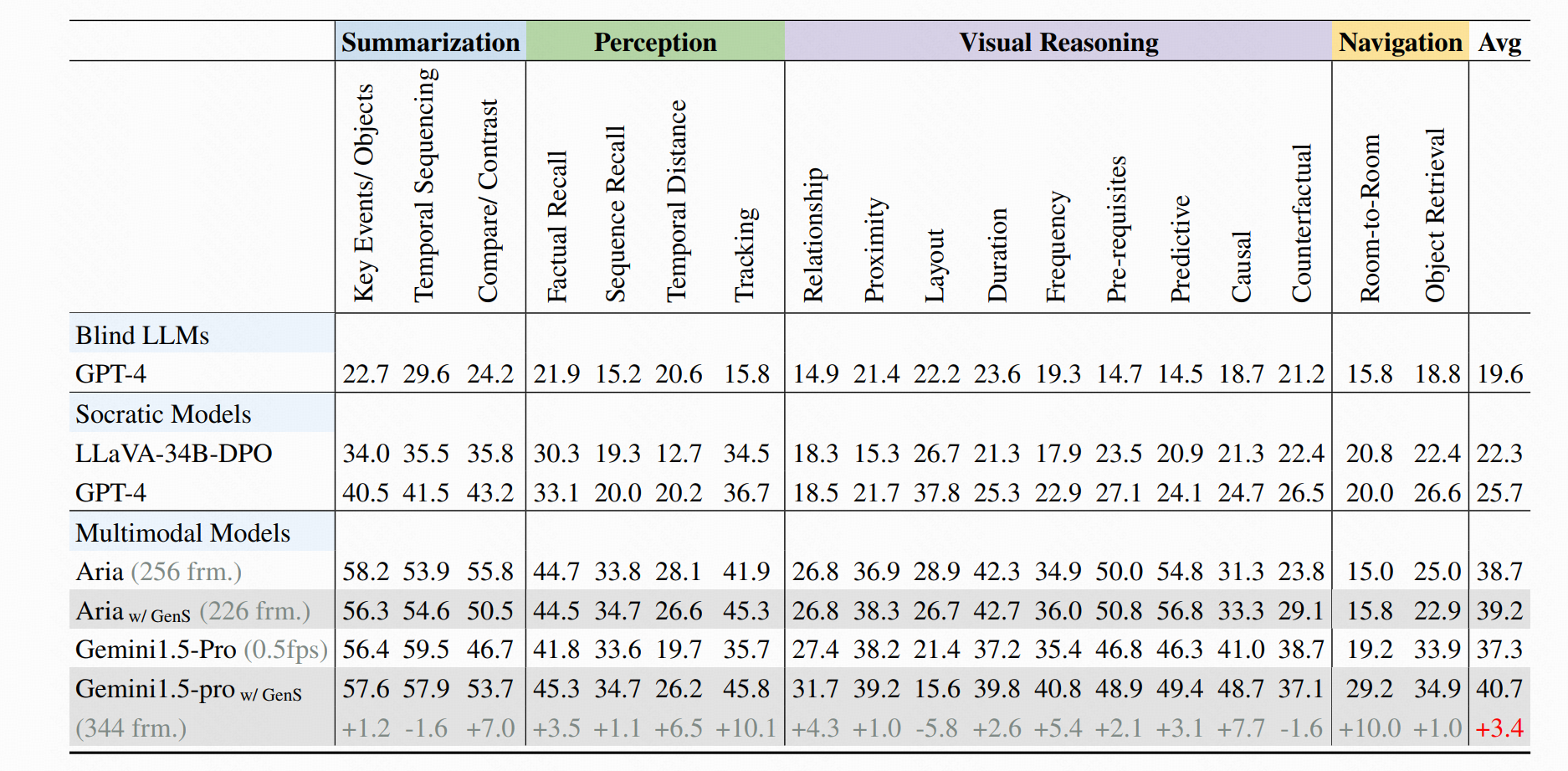
- 🏆 **HourVideo**: Aria w/ GenS obtains **39.2** accuracy, while Gemini-1.5-pro w/ GenS obtains **40.7** accuracy
## Key Features of GenS
✨ **Temporal Understanding:**
GenS effectively captures temporal relationships between successive frames, enabling complex reasoning about temporal sequences such as "immediately after" events in videos.
📝 **Complex Instruction Understanding:**
Powered by built-in LLMs, GenS comprehends complex and flexible textual instructions, allowing it to interpret nuanced queries and identify the most relevant visual content.
⚡ **Effective Video-Text Alignment:**
Its native multi-modal architecture enables sophisticated multi-hop reasoning by seamlessly aligning long-range temporal cues with language semantics, resulting in more accurate frame selection.
🎉 **State-of-the-Art Performance:**
GenS significantly boosts the performance of various VideoQA models, achieving SOTA results on long-form video benchmarks when integrated with open-source models.
## Performance Highlights
- 🏆 **LongVideoBench**: LLaVA-Video-72B w/ GenS achieves **66.8** accuracy (+4.3)
- 🏆 **MLVU**: LLaVA-Video-72B w/ GenS achieves **77.0** accuracy (+2.7)
- 🏆 **HourVideo**: Aria w/ GenS obtains **39.2** accuracy, while Gemini-1.5-pro w/ GenS obtains **40.7** accuracy
 ## Quick Start
### Installation
After creating your conda environment, install the required dependencies:
```
pip install transformers==4.45.0 accelerate==0.34.1 sentencepiece==0.2.0 torchvision requests torch Pillow
pip install flash-attn --no-build-isolation
```
### Usage
```
import torch
from PIL import Image
import sys
import os
from typing import List
# Import required libraries
from transformers import AutoProcessor, AutoTokenizer, AutoConfig, AutoModel, AutoModelForCausalLM
from yivl.yivl_model_hf import YiVLForConditionalGeneration, YiVLConfig
from yivl.siglip_navit_490 import NaViTProcessor
from yivl.constants import (
DEFAULT_IMAGE_END_TOKEN,
DEFAULT_IMAGE_START_TOKEN,
DEFAULT_IMAGE_TOKEN,
IMAGE_TOKEN_INDEX,
)
from deepseekv1moe.modeling_deepseek import DeepseekConfig, DeepseekForCausalLM
def setup_model():
"""Set up and load the GenS model and its components."""
# Register custom models with the Auto classes
AutoConfig.register("yi_vl", YiVLConfig)
AutoModel.register(YiVLConfig, YiVLForConditionalGeneration)
AutoConfig.register("deepseek", DeepseekConfig)
AutoModelForCausalLM.register(DeepseekConfig, DeepseekForCausalLM)
# Load model from Hugging Face
model_id = "yaolily/GenS"
# Load configuration
config = AutoConfig.from_pretrained(model_id)
# Load model with optimizations
model = AutoModel.from_pretrained(
model_id,
attn_implementation="flash_attention_2",
low_cpu_mem_usage=True,
torch_dtype=torch.bfloat16
).to(torch.device("cuda"))
# Load tokenizer with special token handling
tokenizer = AutoTokenizer.from_pretrained(model_id, use_fast=False, trust_remote_code=True)
if not tokenizer.pad_token or tokenizer.pad_token_id < 0:
try:
tokenizer.add_special_tokens({"pad_token": "
## Quick Start
### Installation
After creating your conda environment, install the required dependencies:
```
pip install transformers==4.45.0 accelerate==0.34.1 sentencepiece==0.2.0 torchvision requests torch Pillow
pip install flash-attn --no-build-isolation
```
### Usage
```
import torch
from PIL import Image
import sys
import os
from typing import List
# Import required libraries
from transformers import AutoProcessor, AutoTokenizer, AutoConfig, AutoModel, AutoModelForCausalLM
from yivl.yivl_model_hf import YiVLForConditionalGeneration, YiVLConfig
from yivl.siglip_navit_490 import NaViTProcessor
from yivl.constants import (
DEFAULT_IMAGE_END_TOKEN,
DEFAULT_IMAGE_START_TOKEN,
DEFAULT_IMAGE_TOKEN,
IMAGE_TOKEN_INDEX,
)
from deepseekv1moe.modeling_deepseek import DeepseekConfig, DeepseekForCausalLM
def setup_model():
"""Set up and load the GenS model and its components."""
# Register custom models with the Auto classes
AutoConfig.register("yi_vl", YiVLConfig)
AutoModel.register(YiVLConfig, YiVLForConditionalGeneration)
AutoConfig.register("deepseek", DeepseekConfig)
AutoModelForCausalLM.register(DeepseekConfig, DeepseekForCausalLM)
# Load model from Hugging Face
model_id = "yaolily/GenS"
# Load configuration
config = AutoConfig.from_pretrained(model_id)
# Load model with optimizations
model = AutoModel.from_pretrained(
model_id,
attn_implementation="flash_attention_2",
low_cpu_mem_usage=True,
torch_dtype=torch.bfloat16
).to(torch.device("cuda"))
# Load tokenizer with special token handling
tokenizer = AutoTokenizer.from_pretrained(model_id, use_fast=False, trust_remote_code=True)
if not tokenizer.pad_token or tokenizer.pad_token_id < 0:
try:
tokenizer.add_special_tokens({"pad_token": "