---
license: openrail
library_name: transformers
tags:
- ocr
- vlm
---
# Chandra
Chandra is an OCR model that outputs markdown, HTML, and JSON. It is highly accurate at extracting text from images and PDFs, while preserving layout information.
You can try Chandra in the free playground [here](https://www.datalab.to/playground), or at a hosted API [here](https://www.datalab.to/).
## Features
- Convert documents to markdown, html, or json with detailed layout information
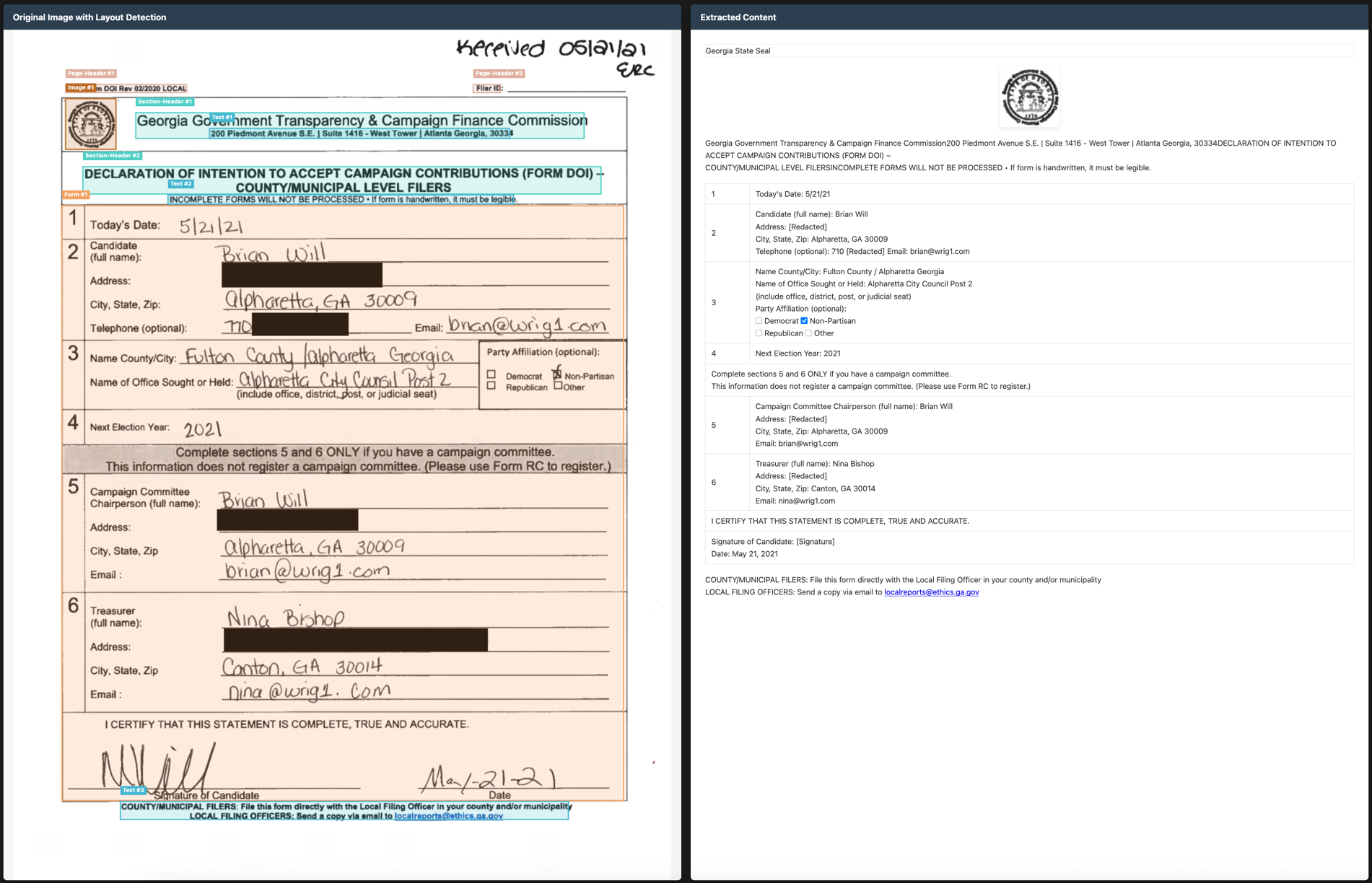
- Good handwriting support
- Reconstructs forms accurately, including checkboxes
- Good support for tables, math, and complex layouts
- Extracts images and diagrams, with captions and structured data
- Support for 40+ languages
## Quickstart
The easiest way to start is with the CLI tools:
```shell
pip install chandra-ocr
# With VLLM
chandra_vllm
chandra input.pdf ./output
# With HuggingFace
chandra input.pdf ./output --method hf
# Interactive streamlit app
chandra_app
```
## Benchmarks
We used the olmocr benchmark, which seems to be the most reliable current OCR benchmark in our testing.
 | **Model** | ArXiv | Old Scans Math | Tables | Old Scans | Headers and Footers | Multi column | Long tiny text | Base | Overall | Source |
|:----------|:--------:|:--------------:|:--------:|:---------:|:-------------------:|:------------:|:--------------:|:----:|:--------------:|:------:|
| Datalab Chandra v0.1.0 | 82.2 | **80.3** | **88.0** | **50.4** | 90.8 | 81.2 | **92.3** | **99.9** | **83.1 ± 0.9** | Own benchmarks |
| Datalab Marker v1.10.0 | **83.8** | 69.7 | 74.8 | 32.3 | 86.6 | 79.4 | 85.7 | 99.6 | 76.5 ± 1.0 | Own benchmarks |
| Mistral OCR API | 77.2 | 67.5 | 60.6 | 29.3 | 93.6 | 71.3 | 77.1 | 99.4 | 72.0 ± 1.1 | olmocr repo |
| Deepseek OCR | 75.2 | 72.3 | 79.7 | 33.3 | 96.1 | 66.7 | 80.1 | 99.7 | 75.4 ± 1.0 | Own benchmarks |
| GPT-4o (Anchored) | 53.5 | 74.5 | 70.0 | 40.7 | 93.8 | 69.3 | 60.6 | 96.8 | 69.9 ± 1.1 | olmocr repo |
| Gemini Flash 2 (Anchored) | 54.5 | 56.1 | 72.1 | 34.2 | 64.7 | 61.5 | 71.5 | 95.6 | 63.8 ± 1.2 | olmocr repo |
| Qwen 3 VL | 70.2 | 75.1 | 45.6 | 37.5 | 89.1 | 62.1 | 43.0 | 94.3 | 64.6 ± 1.1 | Own benchmarks |
| olmOCR v0.3.0 | 78.6 | 79.9 | 72.9 | 43.9 | **95.1** | 77.3 | 81.2 | 98.9 | 78.5 ± 1.1 | olmocr repo |
| dots.ocr | 82.1 | 64.2 | 88.3 | 40.9 | 94.1 | **82.4** | 81.2 | 99.5 | 79.1 ± 1.0 | dots.ocr repo |
## Examples
| **Model** | ArXiv | Old Scans Math | Tables | Old Scans | Headers and Footers | Multi column | Long tiny text | Base | Overall | Source |
|:----------|:--------:|:--------------:|:--------:|:---------:|:-------------------:|:------------:|:--------------:|:----:|:--------------:|:------:|
| Datalab Chandra v0.1.0 | 82.2 | **80.3** | **88.0** | **50.4** | 90.8 | 81.2 | **92.3** | **99.9** | **83.1 ± 0.9** | Own benchmarks |
| Datalab Marker v1.10.0 | **83.8** | 69.7 | 74.8 | 32.3 | 86.6 | 79.4 | 85.7 | 99.6 | 76.5 ± 1.0 | Own benchmarks |
| Mistral OCR API | 77.2 | 67.5 | 60.6 | 29.3 | 93.6 | 71.3 | 77.1 | 99.4 | 72.0 ± 1.1 | olmocr repo |
| Deepseek OCR | 75.2 | 72.3 | 79.7 | 33.3 | 96.1 | 66.7 | 80.1 | 99.7 | 75.4 ± 1.0 | Own benchmarks |
| GPT-4o (Anchored) | 53.5 | 74.5 | 70.0 | 40.7 | 93.8 | 69.3 | 60.6 | 96.8 | 69.9 ± 1.1 | olmocr repo |
| Gemini Flash 2 (Anchored) | 54.5 | 56.1 | 72.1 | 34.2 | 64.7 | 61.5 | 71.5 | 95.6 | 63.8 ± 1.2 | olmocr repo |
| Qwen 3 VL | 70.2 | 75.1 | 45.6 | 37.5 | 89.1 | 62.1 | 43.0 | 94.3 | 64.6 ± 1.1 | Own benchmarks |
| olmOCR v0.3.0 | 78.6 | 79.9 | 72.9 | 43.9 | **95.1** | 77.3 | 81.2 | 98.9 | 78.5 ± 1.1 | olmocr repo |
| dots.ocr | 82.1 | 64.2 | 88.3 | 40.9 | 94.1 | **82.4** | 81.2 | 99.5 | 79.1 ± 1.0 | dots.ocr repo |
## Examples
 | Type | Name | Link |
|------|------|------|
| Tables | Water Damage Form | [View](https://github.com/datalab-to/chandra/blob/master/assets/examples/tables/water_damage.png) |
| Tables | 10K Filing | [View](https://github.com/datalab-to/chandra/blob/master/assets/examples/tables/10k.png) |
| Forms | Handwritten Form | [View](https://github.com/datalab-to/chandra/blob/master/assets/examples/forms/handwritten_form.png) |
| Forms | Lease Agreement | [View](https://github.com/datalab-to/chandra/blob/master/assets/examples/forms/lease.png) |
| Handwriting | Doctor Note | [View](https://github.com/datalab-to/chandra/blob/master/assets/examples/handwriting/doctor_note.png) |
| Handwriting | Math Homework | [View](https://github.com/datalab-to/chandra/blob/master/assets/examples/handwriting/math_hw.png) |
| Books | Geography Textbook | [View](https://github.com/datalab-to/chandra/blob/master/assets/examples/books/geo_textbook_page.png) |
| Books | Exercise Problems | [View](https://github.com/datalab-to/chandra/blob/master/assets/examples/books/exercises.png) |
| Math | Attention Diagram | [View](https://github.com/datalab-to/chandra/blob/master/assets/examples/math/attn_all.png) |
| Math | Worksheet | [View](https://github.com/datalab-to/chandra/blob/master/assets/examples/math/worksheet.png) |
| Math | EGA Page | [View](https://github.com/datalab-to/chandra/blob/master/assets/examples/math/ega.png) |
| Newspapers | New York Times | [View](https://github.com/datalab-to/chandra/blob/master/assets/examples/newspapers/nyt.png) |
| Newspapers | LA Times | [View](https://github.com/datalab-to/chandra/blob/master/assets/examples/newspapers/la_times.png) |
| Other | Transcript | [View](https://github.com/datalab-to/chandra/blob/master/assets/examples/other/transcript.png) |
| Other | Flowchart | [View](https://github.com/datalab-to/chandra/blob/master/assets/examples/other/flowchart.png) |
## Usage
### Installation
```shell
pip install chandra-ocr
```
### From code
```python
from chandra.model import InferenceManager
from chandra.model.schema import BatchInputItem
# Run chandra_vllm to start a vLLM server first if you pass vllm, else pass hf
# you can also start your own vllm server with the datalab-to/chandra model
manager = InferenceManager(method="vllm")
batch = [
BatchInputItem(
image=PIL_IMAGE,
prompt_type="ocr_layout"
)
]
result = manager.generate(batch)[0]
print(result.markdown)
```
### With transformers
```python
from transformers import AutoModel, AutoProcessor
from chandra.model.hf import generate_hf
from chandra.model.schema import BatchInputItem
from chandra.output import parse_markdown
model = AutoModel.from_pretrained("datalab-to/chandra").cuda()
model.processor = AutoProcessor.from_pretrained("datalab-to/chandra")
batch = [
BatchInputItem(
image=PIL_IMAGE,
prompt_type="ocr_layout"
)
]
result = generate_hf(batch, model)[0]
markdown = parse_markdown(result.raw)
```
# Credits
Thank you to the following open source projects:
- [Huggingface Transformers](https://github.com/huggingface/transformers)
- [VLLM](https://github.com/vllm-project/vllm)
- [olmocr](github.com/allenai/olmocr)
- [Qwen 3 VL](https://github.com/QwenLM/Qwen3)
| Type | Name | Link |
|------|------|------|
| Tables | Water Damage Form | [View](https://github.com/datalab-to/chandra/blob/master/assets/examples/tables/water_damage.png) |
| Tables | 10K Filing | [View](https://github.com/datalab-to/chandra/blob/master/assets/examples/tables/10k.png) |
| Forms | Handwritten Form | [View](https://github.com/datalab-to/chandra/blob/master/assets/examples/forms/handwritten_form.png) |
| Forms | Lease Agreement | [View](https://github.com/datalab-to/chandra/blob/master/assets/examples/forms/lease.png) |
| Handwriting | Doctor Note | [View](https://github.com/datalab-to/chandra/blob/master/assets/examples/handwriting/doctor_note.png) |
| Handwriting | Math Homework | [View](https://github.com/datalab-to/chandra/blob/master/assets/examples/handwriting/math_hw.png) |
| Books | Geography Textbook | [View](https://github.com/datalab-to/chandra/blob/master/assets/examples/books/geo_textbook_page.png) |
| Books | Exercise Problems | [View](https://github.com/datalab-to/chandra/blob/master/assets/examples/books/exercises.png) |
| Math | Attention Diagram | [View](https://github.com/datalab-to/chandra/blob/master/assets/examples/math/attn_all.png) |
| Math | Worksheet | [View](https://github.com/datalab-to/chandra/blob/master/assets/examples/math/worksheet.png) |
| Math | EGA Page | [View](https://github.com/datalab-to/chandra/blob/master/assets/examples/math/ega.png) |
| Newspapers | New York Times | [View](https://github.com/datalab-to/chandra/blob/master/assets/examples/newspapers/nyt.png) |
| Newspapers | LA Times | [View](https://github.com/datalab-to/chandra/blob/master/assets/examples/newspapers/la_times.png) |
| Other | Transcript | [View](https://github.com/datalab-to/chandra/blob/master/assets/examples/other/transcript.png) |
| Other | Flowchart | [View](https://github.com/datalab-to/chandra/blob/master/assets/examples/other/flowchart.png) |
## Usage
### Installation
```shell
pip install chandra-ocr
```
### From code
```python
from chandra.model import InferenceManager
from chandra.model.schema import BatchInputItem
# Run chandra_vllm to start a vLLM server first if you pass vllm, else pass hf
# you can also start your own vllm server with the datalab-to/chandra model
manager = InferenceManager(method="vllm")
batch = [
BatchInputItem(
image=PIL_IMAGE,
prompt_type="ocr_layout"
)
]
result = manager.generate(batch)[0]
print(result.markdown)
```
### With transformers
```python
from transformers import AutoModel, AutoProcessor
from chandra.model.hf import generate_hf
from chandra.model.schema import BatchInputItem
from chandra.output import parse_markdown
model = AutoModel.from_pretrained("datalab-to/chandra").cuda()
model.processor = AutoProcessor.from_pretrained("datalab-to/chandra")
batch = [
BatchInputItem(
image=PIL_IMAGE,
prompt_type="ocr_layout"
)
]
result = generate_hf(batch, model)[0]
markdown = parse_markdown(result.raw)
```
# Credits
Thank you to the following open source projects:
- [Huggingface Transformers](https://github.com/huggingface/transformers)
- [VLLM](https://github.com/vllm-project/vllm)
- [olmocr](github.com/allenai/olmocr)
- [Qwen 3 VL](https://github.com/QwenLM/Qwen3)